How it Works
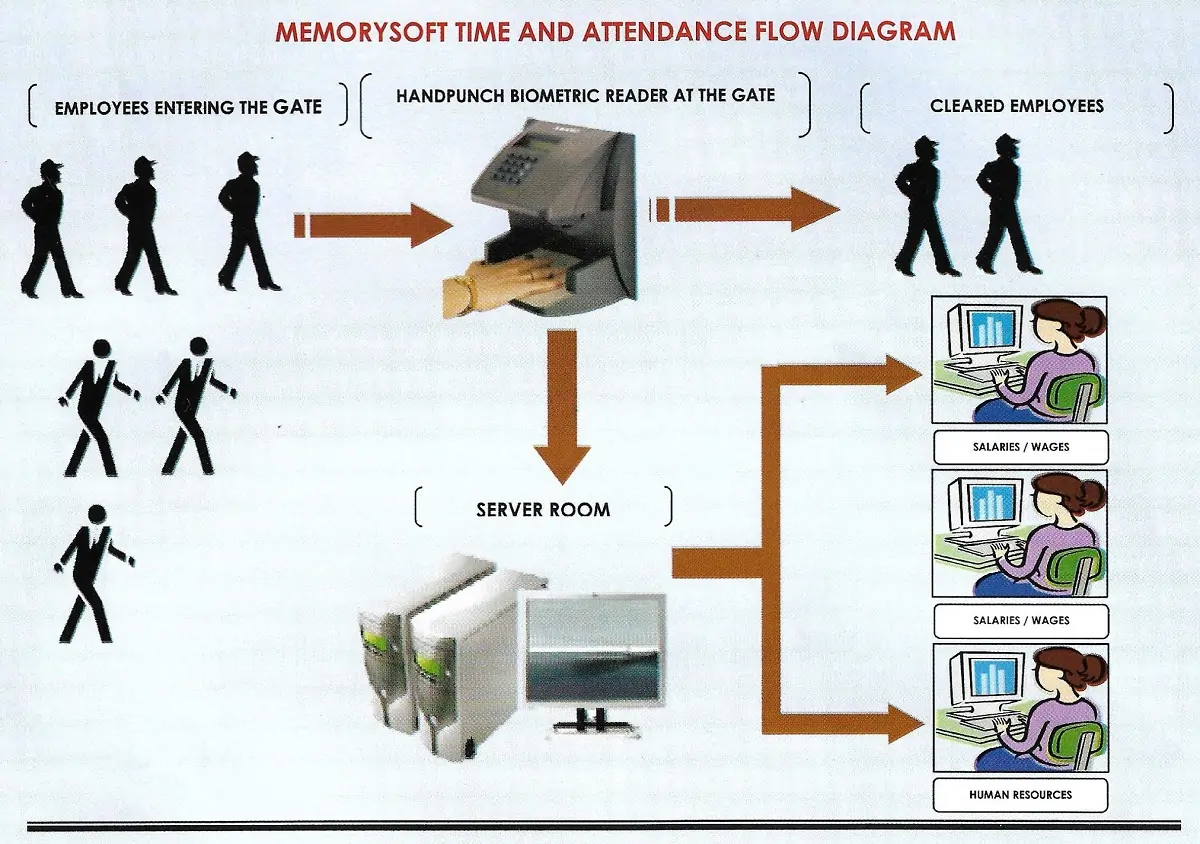
- Employees are provided with an Identification Card (Thumb, Palm recognition can also be used).
- Employee’s swipe at point of entry where a swipe reader has been mounted.
- The swipe reader registers date of clocking, time, shift, authorization code, employee code and swipe card code.
- On-line verification of time cards and time sheets is done by supervisors and authorized managers.
- The TnA software at the central computer unit automatically calculates hours worked, overtime hours worked, short time worked, shift worked etc etc.
- The result is used to process payroll and/or produce management and administration reports e.g. punctuality, absence etc.
Scheduling employee shift function
This makes employee scheduling easier, and manages the time and attendance process by exception.Some highlights are:
- Handles day shifts, night shifts, multiple shifts and shifts that run past the midnight mark.
- Handles Am/Pm (3:55pm) and Military time (15:55) GMT 24hour clock.
- Time displayed in Hours, Minutes and Seconds.
- Downloading employee schedule to data collection devices.
- This ensures precise and timely employee scheduling, improving planning efficiency by managing the time and attendance process by exception.
- Scheduling prevents an employee from punching IN / OUT when they deviate from the schedule.
- Optional scheduling from selected employees.
Dynamic schedules from pay period to another.
Employee classification function
- Personnel can be assigned to a group, such as department number, visitor, Contractor, etc., for easy editing of access privileges. This makes system edits easy to implement for each group.
- Employees can use the same badge for controlled access and time and attendance to avoid duplication.
Gatekeeper System
The Gatekeeper software provides the control managers require to determine which personnel will be allowed to use designated entryways, and when.
Systems operators use the software to create gate lists that are downloaded to the gatekeeper terminals.
The gate list determines who can receive access to each entryway.
The Gatekeeper software generates a variety of reports, which detail what personnel have accessed the controlled entryways of a facility.
Reports can be generated for a single person to trace movement through a facility, or for a door to examine traffic flow through an entryway.
Personnel data is sorted by department, badge number, employee name, door group, or classification.
The software also has a feature that enables the image photo to pop out at the gatekeeper computer screen for the watchman to use to confirm authenticity. The images can be instantly retrieved, updated and verified.
Image Keeper function
Image Keeper System provides a ‘one-stop’ solution for all your company’s identification, time and attendance, and access control needs.
The system supports video and digital cameras and allows you to store an employee’s photo, signature, and other identifying data in an ODBC-compliant database.
Image keeper software provides one of the most flexible and versatile approaches to ID card creation.
Any combination of text, logos, data, graphics or images can be used to create the perfect ID card layout for your specific needs. Image keeper software can print a barcode or encode a magnetic stripe during the printing process.
This option streamlines the task of issuing cards by using the printer to perform both functions at the same time.
TWAIN – Compliant i.e. Photo scanners, Document scanners, Digital and Video cameras.
Messaging function
The Messaging function provides user access to the messaging capabilities of Memory TnA Terminal to create messages, assign messages to employees, and configure global scrolling messages from the PC.
The software also performs a reporting function, allowing an operator to determine which messages have been seen and accepted by the employee at the timekeeper terminal.
Card Saver function automatically archives employees’ “punches” and allows for easy retrieval of the data (to verify employee data for regulatory inquiries, performance reviews, or resolving union grievances.)
Archive function handles long-term employee keeping by automatically accumulating, processing, and storing critical labor data to create an employee attendance database.
Timesheet Editor Function
Changes to an employee’s timesheet are automatically recorded in the audit-trail and the totals are updated. You can view the totals and audit trail simultaneously with punch information, or simply click on the Totals or Audit Window tab for full-screen views.
It has employee chart feature that graphically examines data.
Electronic Sign-off, which lets supervisors, if authorized, electronically sign-off on employees timesheet records.
Approval of Timesheets and Upload
The Manager will approve the timesheet after which all records are locked. Approved totals will then be used for Audit. An upload file is then created for importation into the Payroll software if not integrated.
Techno phobia
Some staff have difficulty working with certain types of new technology and can sometimes resist its introduction and utilization. In most cases training can help remove the fear and misunderstanding that may exist. At these times it is important to emphasis the benefits to individual staff members of the new technology.
Security function
Security Increases in confidence and integrity of company systems.
With the reduction or elimination of fraud, theft and unauthorized access, there comes a corresponding increase in the confidence and integrity of company systems and procedures.
This in turn, can actually increase overall morale of staff and even the share holders.
- Personnel can be granted one of three levels of door access: No access, Full access, and Scheduled access. Scheduled access can be set to coincide with the work schedule as recorded in the Timekeeper database. In addition, a facility’s doors can be scheduled to lock and unlock at designated times, so all personnel can pass at will.
- Security men can perform the physical identification of personnel before granting access/entry.
- System administrators can provide each user with customized access to only the system function that their job requires.
- Access to the system is controlled by user log-on codes and encrypted passwords.
- Multi-level security profiles grant viewing and editing access privileges to management and employees.
- Security monitoring: Automated notification of security sensitive events as well as support issues e.g. unauthorized swipe at designated points.
- Prevents unauthorized access by employees and non-employees to secured doors or turnstiles.
- You can set different levels of access for each entryway, and for each group or individual personnel.Door access can be controlled by schedules which are imported from the Timekeeper Central System or entered directly.
Hardware Standard Specifications
- All Clocks are linked to central Communication Server
- All the clocks have Power Back-up devices. No loss of proximity readings.
- Clocks stress 20,000 proximity readings thus Line failure will not affect the readings
- There are ready replacement clocks if there is network failure.
- Clocking History
- Keeping track of employee data, clocking, departments, absences, and holidays
- Tracking attendance, manage overtime
- Accommodating of offsite workers
- Optional Equipment: – Digital camera (Kodak DC 3400, Tripod stand and Backdrop, Laminator, Card printer, Guillotine, Spot lamps etc .Not economical for in house card production unless your organization has more than 1000 employees. We produce the badges at our premises at a small cost.
- Approval of Timesheets and Upload
- Manager will approve the timesheet after which all records are locked
- Approved totals will then be used for Audit
- Upload file created for importation into the Payroll